


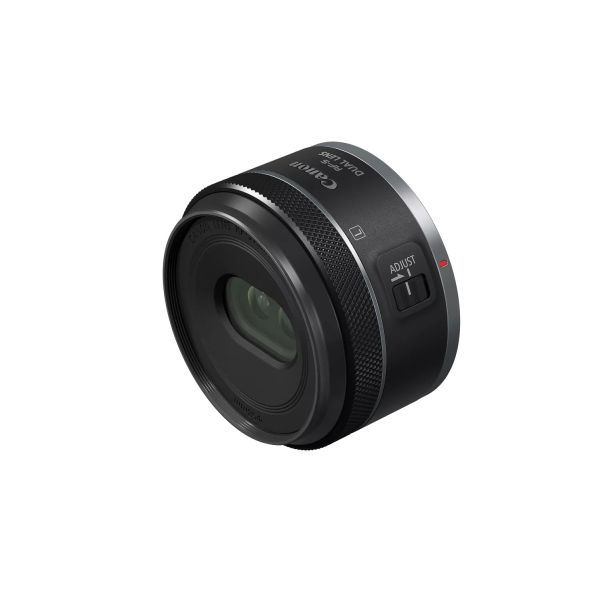
RF-S7.8mm F4 STM DUAL


Overview Tell Your Story with 3D Depth With the growth of the VR headset market, there is an excellent opportunity for Content creators to create CAMERA-CAPTURED content, and to expand their audience by creating 3D experiences with a level of 3D immersion not possible with traditional flat 2-dimensional content. And now you can capture and share your adventures, your daily explorations, memories and powerful portraits using this new Canon stereoscopic lens without spending thousands to make it a reality. Features Simple, Straight Path Optics Canon was the first to offer a high-resolution single sensor solution for creating VR content with the RF-5.2mm F2.8 L DUAL FISHEYE lens, and it was no small feat. In order to get so many high-quality lenses into a compact body, and ensure the final image was directed to one image sensor, a folded optical path with prisms was used. This is an elegant and effective solution, but not a low cost one. We have been able to apply all of our lens making knowledge from over the decades, and everything we learned from that first VR lens we introduced, so that we were able to create an efficient straight-path optical design with fewer lenses which reduces weight and increases quality, and at a price within reach of most content creators. VR with Ease Pairing just this one lens to an EOS R7 (firmware 1.5.0+) or R50 V camera provides the capability of delivering a single file— creating a powerful and convenient solution compared to traditional VR systems which capture a 3D scene with two separate fisheye lenses, recording that imagery to two separate cameras or image sensors, which write two files. This can save the user time and effort behind the camera, and in post-production by helping to solve issues such as multi-camera positioning, multi-lens syncing, image stitching, audio syncing, encoding and more. EOS VR System Canon's EOS VR System is expanding and you now multiple options of camera and lens combinations, but let’s not forget the third tripod leg of the EOS VR system, which is the software. The EOS VR Software Applications — The EOS VR Utility and EOS VR Plug-in for Adobe Premiere Pro. This is our first lens to offer “Spatial” video as well as traditional 3D files, and the EOS VR Utility will be able to output those formats. This powerful and convenient combination provides much desired flexibility and efficiency, helping save you precious time accessing your content so you can prepare it and share it more quickly. LEARN MORE ABOUT THE EOS VR SYSTEM EOS VR Utility and EOS VR Plug-in Canon's subscription-based software solutions are an integral part of Canon's EOS VR System, and have been updated to support the new RF-S7.8mm F4 STM DUAL lens — The EOS VR Utility, a standalone software application, and the EOS VR Plug-in for Adobe Premiere Pro allow two different workflow experiences for VR creators and studios. EOS VR Utility allows for output of multiple formats like 3D 180°, 3D Theater, 8:9, 16:9, full capture, and Spatial (1:1) video. EOS VR Plug-in for Adobe Premiere Pro enables editing and stereoscopic image conversion processing and exporting in 3D 180º format at various resolutions and file formats. 3D 180º, and 3D Theater can be viewed in compatible Head Mount Displays (such as the Meta Quest 3) and other VR viewing platforms. Spatial Video can be viewed in Apple Vision Pro. Note: EOS VR Plug-in for Adobe Premiere Pro supports: .JPEG Stills and .MP4 Video Files. EOS VR Utility supports .JPEG Stills, .MP4 Video files, and .CRM RAW Files. 60° Field of View and an Interpupillary Distance of 11.8mm This lens is designed specifically to deliver outstanding stereoscopic 3D imagery. Featuring dual 7.8mm lenses positioned with 11.8mm of spacing between Left and Right Lens centers, it provides an interpupillary distance closely resembling human vision with a natural parallax for a powerful, immersive experience that brings the viewer to feel they are within the scene where the video or still image takes place. A 60° optical field of view provides the viewer the ability to change their viewing angle within the recorded scene, allowing them to look around with use of a compatible head mount display. The 144º field of view offers some distinct advantages for certain production situations. For example, pixel density Footnote 1 is increased and provides higher resolution even in 4K Fine mode. Another advantage is being able to use a tripod, gimbal or microphones and not having them end up in the shot. You can also enjoy taking close-up images without distortion. Auto Focusing Featuring a gear-type stepping motor (STM) with a dual-lens autofocus mechanism, which drives the left and right lenses in unison. This makes AF as simple to operate as with an ordinary RF lens. One feature of RF lenses that enhances operability is the electronic focusing/control ring. The left-right focus differential can be adjusted using the focusing/control ring and the left-right focus difference adjustment mode switch. The AF operates only on subjects within the image circle of the left lens. Large Aperture of f/4 to a Deep Depth of Field of f/16. The RF-S7.8mm F4 STM DUAL Lens is designed with dual optical systems with coordinated electronically controlled apertures. These provide a highly adaptable aperture range — allowing you to go from an f/4 aperture, to a deep depth of field of f/16 for more control of your exposure in brighter environments. Additionally, since both lenses are contained in a standard lens housing, it has a 58mm front screw thread for filters. Camera Firmware To help improve the user experience with the uniqueness of shooting with the RF-S7.8mm F4 STM DUAL lens, special features have been added to the firmware to optimize VR shooting. This firmware provides metadata information for the software to convert the image from fisheye to equirectangular. One of the features enabled with the use of this lens is a "Magic Window" on-screen overlay, accessed by tapping the [INFO] button that assists the creator in framing the central resting position which shows an approximate field of view in the composition. The pairing of this lens and an EOS R7 camera allows for video recordings at up to 4K 60p equivalent resolution, or 7K oversampled video at 4K 30p. The pairing of this lens and an EOS R50 V camera allows for video recordings of 6K oversampled video at 4K 30p. Canon Camera Connect and EOS Utility For shooting remotely, the ability to monitor with features such as the "Magic Window" overlay, left/right lens viewing swap, and fisheye to equirectangular preview is available in the Canon Camera Connect app or when using EOS Utility software, making it easy to remotely view and record content.
- Shooting Mode: Focus Guide Operation
- Photo Mode: Left lens only supports focus guide
- Photo Mode with L/R adjustment switch enabled: Both Left and Right lenses support focus guide.
- Video Mode: Left lens only supports focus guide.
- Video Mode with L/R adjustment switch enabled: Both Left and Right lenses support focus guide.
- sku: 6795C002
- SKU: 6795C002
- Technical Specifications Expand All: View Full Technical Specs PDF Techs. Specs. Detailed PDF View Full Details of Technical Specification Lens Focal Length 7.8mm Maximum and Minimum Aperture f/4.0 – f/16 (1/3 stops, 1/2 stops) Lens Mount Type Canon RF Mount; Plastic Mount Interpupillary Distance / Baseline Length (Distance between Lef
- Lens Focal Length 7.8mm Maximum and Minimum Aperture f/4.0: f/16 (1/3 stops, 1/2 stops) Lens Mount Type Canon RF Mount; Plastic Mount Interpupillary Distance / Baseline Length (Distance between Left and Right Lens Centers) 11.8mm Minimum Focusing Distance 0.66 ft. (7.9 in.) / 0.15 m Maximum Magnification 0.07x Angle of View (Diagonal) 63° 00' Lens Constructi
- Focal Length 7.8mm Maximum and Minimum Aperture f/4.0: f/16 (1/3 stops, 1/2 stops) Lens Mount Type Canon RF Mount; Plastic Mount Interpupillary Distance / Baseline Length (Distance between Left and Right Lens Centers) 11.8mm Minimum Focusing Distance 0.66 ft. (7.9 in.) / 0.15 m Maximum Magnification 0.07x Angle of View (Diagonal) 63° 00' Lens Constructi
- Focal Length 7.8mm: Maximum and Minimum Aperture f/4.0 – f/16 (1/3 stops, 1/2 stops)
- f/4.0: f/16 (1/3 stops, 1/2 stops)
- Dimensions ø2.7" x 1.6" L: Weight Approx. 4.6 oz. (131g)
- Lens hood Not Supported: Lens Cap E-58II (bundled)
- Failure resulting from Mechanical/Electrical Breakdown: Coverage for Failure of Your Product resulting from mechanical or electrical breakdown as described in the definition of "Failure" begins upon expiration of the shortest portion of the manufacturer’s original parts and/or labor limited warranty and continues for the remainder of Your Term.
- ACCIDENTAL DAMAGE FROM HANDLING (ADH): labor and/or parts required to repair Your Product, or at Our sole discretion, replacement of Your original Product in lieu of repair in consideration of sudden and unforeseen ADH.
- COMPLIMENTARY CUSTOMER SUPPORT: During your Service Contract Term and upon validation of CarePAK coverage with an active Canon Account, Your Contract includes agent-assisted support, for all CarePAK eligible Products, via phone at 1-833-CAREPAK (1-833-227-3725) or email at [email protected].
- NO LEMON GUARANTEE: Within any consecutive twelve (12) month period, if Your Product has three (3) repairs covered under Your Contract for the same problem and a fourth (4th) repair is required for the same problem and considered covered under Your Contract, We will replace Your Product with one of like kind and qualit
- CANON MAINTENANCE SERVICE FOR CAMERAS AND EF/RF LENSES: You are entitled to one (1) Canon Maintenance Service (CMS) procedure per covered Product per year for each year of coverage during the coverage period. This service includes 18-point Digital SLR Maintenance Service and/or 11-point EF/RF Lens Maintenance Service. The CMS service benefit for each Pro
- MAXIFY GX X: Maximum of 80,000 printed pages by the Covered Product.
- WG Series Inkjet Printer: Maximum of 300,000 printed pages by the Covered Product. Should the page count exceed the listed maximum printed page count for these Products only, the eCarePAK coverage will no longer apply regardless of the expiration date printed on the eCarePAK Certificate. All repairs requested beyond the prin
- For Oregon and Montana Residents only: This Extended Protection (Service) Plan is insured by a contractual liability insurance policy issued to Canon U.S.A., Inc. by Sompo Japan Insurance Company of America (“Sompo Japan”), 11405 N. Community House, Suite 600, Charlotte, NC 28277, 704-759-2200. For Oregon residents only: Should CUSA fail
- For Oregon residents only: Should CUSA fail to perform under this eCarePAK within sixty (60) days, you may contact Sompo Japan for recourse.
- For Virginia residents only: If any promise made in the Contract has been denied or has not been honored within 60 days after your request, you may contact the Virginia Department of Agriculture and Consumer Services, Office of Charitable and Regulatory Programs at http://www.vdacs.virginia.gov/food-extended-service-contract-pr
- Advanced Exchange Program: CUSA may elect to service your Covered Product through its Advanced Exchange Program. Under the Advanced Exchange Program, a defective Covered Product will be exchanged for a comparable refurbished Covered Product on an expedited basis, usually by the next business day (or longer if your ship-to add
- Service Provider: In the event that CUSA's technical troubleshooting cannot resolve your problem, CUSA may elect to send a Service Provider to your location in an expedited manner to facilitate the repair of your Covered Product.
- ASF Program (Carry In/): Under CUSA's ASF Program, the defective Covered Product is repaired by an ASF and then returned to you. The CUSA representative will direct you how to obtain the name and phone number of the ASF nearest to you. You must contact the ASF to schedule the repair. DO NOT INCLUDE AN OTHER ITEMS WITH THE C
- Education: Higher
- Government: Federal
- Portrait: High Volume
Write Your Own Review

Quick Shipping
Usually ships in 1 business day
Product Overview
- Tell your story with 3D depth, capture life’s adventures, daily explorations and exciting portraits using this new stereoscopic lens.
- Create high-quality 3D photos and videos, and relive those memories in Spatial, 3D 180° and 3D Theater formats in your compatible headset, such as Apple Vision Pro and Meta Quest 3.
- Compatible with the EOS R7 camera – this new lens is an excellent entry point for creators looking to enter into the Canon EOS VR System.The autofocus mechanism focuses the left and right lens simultaneously by use of a fast and quiet gear-type STM motor that works like any other RF lens.
- 60º field of view to render realistic imagery similar to human vision. Uses the same on-sensor layout as the RF-S 3.9mm F3.5 DUAL FISHEYE lens.
- Straight-path optical system with 2 UD elements for high-quality 3D images and a compact 3D lens design.

easy return
Free shipping
Money back gaurantee
support content